Suppliers change their pages: a new price, a variant out of stock, a manual replaced, a product retired. Sovba: High-Ticket Importer checks the supplier page of every product you sent to your store, once a week, and tells you what changed.
The app warns, it never changes your store by itself. It never changes a price: your selling price is yours to set. The only thing it can do on your store is set a retired product to draft, and only when you click to do it.
Open Supplier changes
In your Shopify admin, click Apps, then Sovba: High-Ticket Importer, then Supplier changes in the app menu.
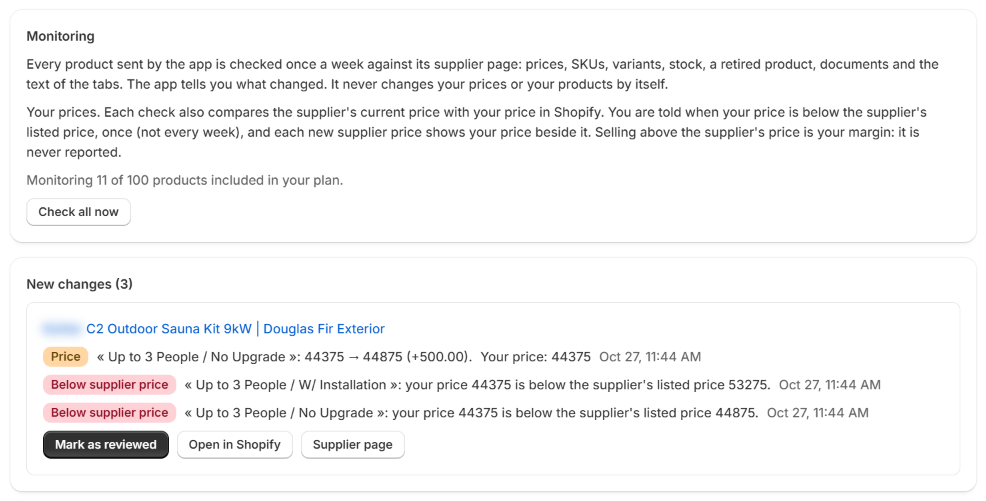
The page has three parts:
| Part | What you find there |
|---|---|
| Monitoring | How many products are monitored, and the button Check all now |
| New changes | What changed since your last review, grouped by product |
| Monitored products | Every product sent to your store, with its status and the date of its last check |
What is checked
Each product's supplier page is opened again and compared with what the app knows about it:
| Change | What it means |
|---|---|
| Price | A variant has a new price at the supplier. Your own price in Shopify is shown beside it |
| Below supplier price | Your price in Shopify is lower than the supplier's listed price |
| SKU | A variant has a new SKU |
| Variant | A variant is no longer offered, or a new one appeared |
| Stock | A variant is out of stock at the supplier, or back in stock |
| Product retired | The supplier page no longer shows the product |
| Document | A document no longer opens, or a new one appeared on the page |
| Tab text | Lines of a tab changed or were removed |
| Page changed | The page changed so much that a new reading is advised |
The check takes about half a minute per product. It uses no import from your plan.
Review the changes
Under New changes, each product shows its changes with their date, and four buttons:
- Mark as reviewed: the changes leave the list. What the supplier shows today becomes the new reference: if the supplier changes again later, even back to an old price, you are told.
- Open in Shopify: opens the product in your admin, to change your price or your stock if you decide to.
- Supplier page: opens the supplier's page, to see the change for yourself.
- Set to draft in my store: shown only for a retired product. It hides the product from shoppers. The product stays in your store, with everything it holds.
Your price below the supplier's. The app compares the price of every variant in your store with the supplier's listed price. When yours is lower, it tells you once, in New changes. As long as it stays lower, the product shows an orange Price below supplier status in Monitored products, even after you mark the change as reviewed. Selling above the supplier's price is your margin: it is never reported.
Check now
The weekly checks run on their own. To check sooner:
- Check all now, in Monitoring, checks every monitored product, one after the other. The page follows the checks on its own: you can leave it and come back.
- Check now, on a product's row in Monitored products, checks that product only.
While a product is being checked, its row shows Checking….
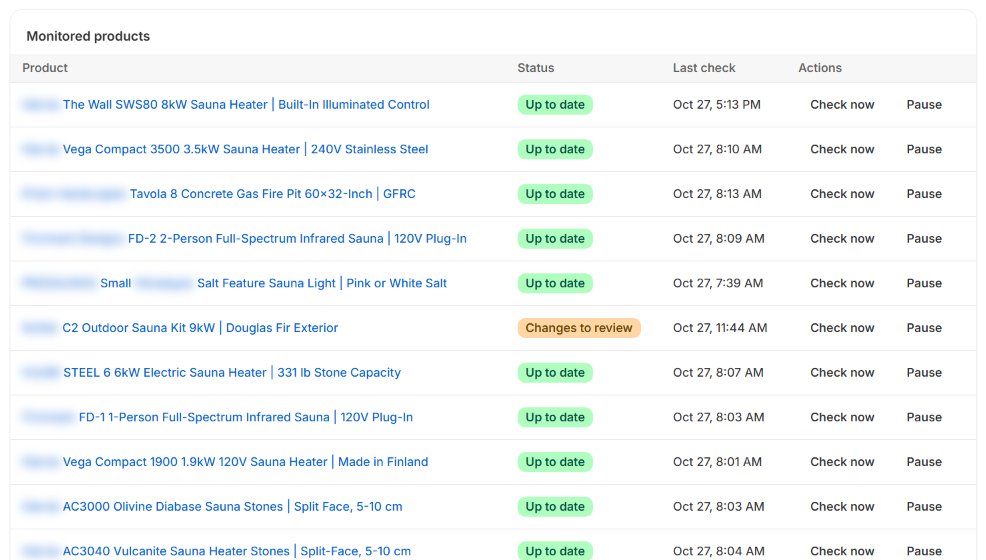
The statuses
| Status | Meaning |
|---|---|
| Up to date | The last check found nothing new |
| Changes to review | Changes are waiting in New changes |
| Price below supplier | Your price is still lower than the supplier's |
| Checking… | The check is running |
| First check soon | The product was sent recently and has not been checked yet |
| Last check failed | The supplier page could not be opened. The app tries again the next day |
| Paused | You paused the monitoring of this product |
| Not monitored (plan limit) | Your plan monitors fewer products than you sent |
Pause a product
Click Pause on a product's row to stop checking it, for example a product you no longer sell. Click Resume to check it again. A paused product does not count in your plan's limit.
How many products are monitored
| Plan | Products monitored every week |
|---|---|
| Starter | 100 |
| Growth | 500 |
| Pro | 2,000 |
The first products you sent are monitored first. When you sent more than your plan monitors, Monitoring says how many are left out: move up a plan to monitor them, or pause products you no longer need to follow. See the guide Your plan and imports.
Good to know
- Only products sent to your store are monitored. A product read but not sent is not checked.
- A deleted import is no longer monitored. The product stays in your store.
- The app never changes a price, a stock level or a product by itself. You decide, in Shopify.
- Supplier prices are the public ones, as shown on the supplier's website, the same as when you imported the product.