Sovba: High-Ticket Importer is billed by Shopify, on your Shopify invoice. You choose a plan when you install the app, and you can change it at any time without contacting us.
The plans
| Plan | Price | Imports per billing cycle | Products monitored every week |
|---|---|---|---|
| Starter | $19 / 30 days | 25 | 100 |
| Growth | $39 / 30 days | 75 | 500 |
| Pro | $69 / 30 days | 150 | 2,000 |
Every plan has every feature: variants and prices, documents, videos, required components, colour swatches, tabs, FAQ and supplier monitoring. Only the number of imports and of monitored products changes. Monitoring uses no import. See the guide Monitor your suppliers.
Every plan starts with a 7-day free trial, with 5 imports. Shopify starts billing when the trial ends.
See what you have used
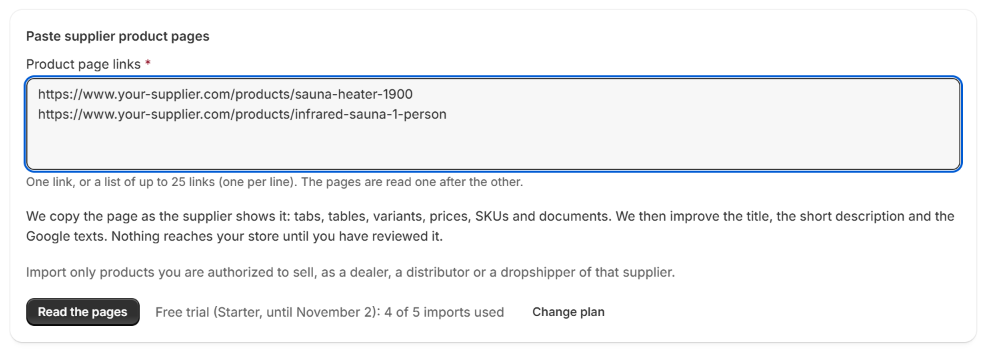
On the New import page, under Read the pages, the app shows your plan and your imports:
- during the trial: Free trial (Starter, until November 2): 2 of 5 imports used;
- after it: Starter plan: 12 of 25 imports used this billing cycle.
What counts as an import
| Counts as one import | Does not count |
|---|---|
| Each supplier page read, from one link or a list | A reading that failed (Not read) |
| Each required component you import from a product page | A link you already imported, left out by the app |
| A page read again with Read again anyway | A link pasted twice in the same list, or a line that is not a link |
| An import you deleted | Everything you do after the reading: sending to your store, editing tabs, linking components |
An import counts as soon as its page starts being read.
When you reach your limit
The app does not start new readings, and says why:
- during the trial: the plan's monthly imports start when your trial ends;
- after it: move up a plan to keep importing, or wait for your next billing cycle.
If you paste a list longer than what your plan has left, the app reads what your plan allows and tells you how many links were not read.
Imports you did not use are not carried over to the next billing cycle.
Change your plan
- Click the button Change plan, next to your imports on the New import page.
- Shopify opens the plan page. Choose your plan, then approve it.
You come back to the app, with the limit of your new plan.
If you stop using the app
When you uninstall the app, Shopify ends your plan. What you imported stays in your store: the products, their variants, prices, photos, documents and descriptions. The content of the tabs and components also stays saved on each product. They are shown by the app's theme blocks, so they stop showing on your product pages while the app is uninstalled, and come back if you install it again.